Restrict Category Access Pro for WooCommerce
WooCommerce Restrict Category Access Pro is a powerful tool that makes protecting product categories fast and easy.
Have a look at all these powerful features:
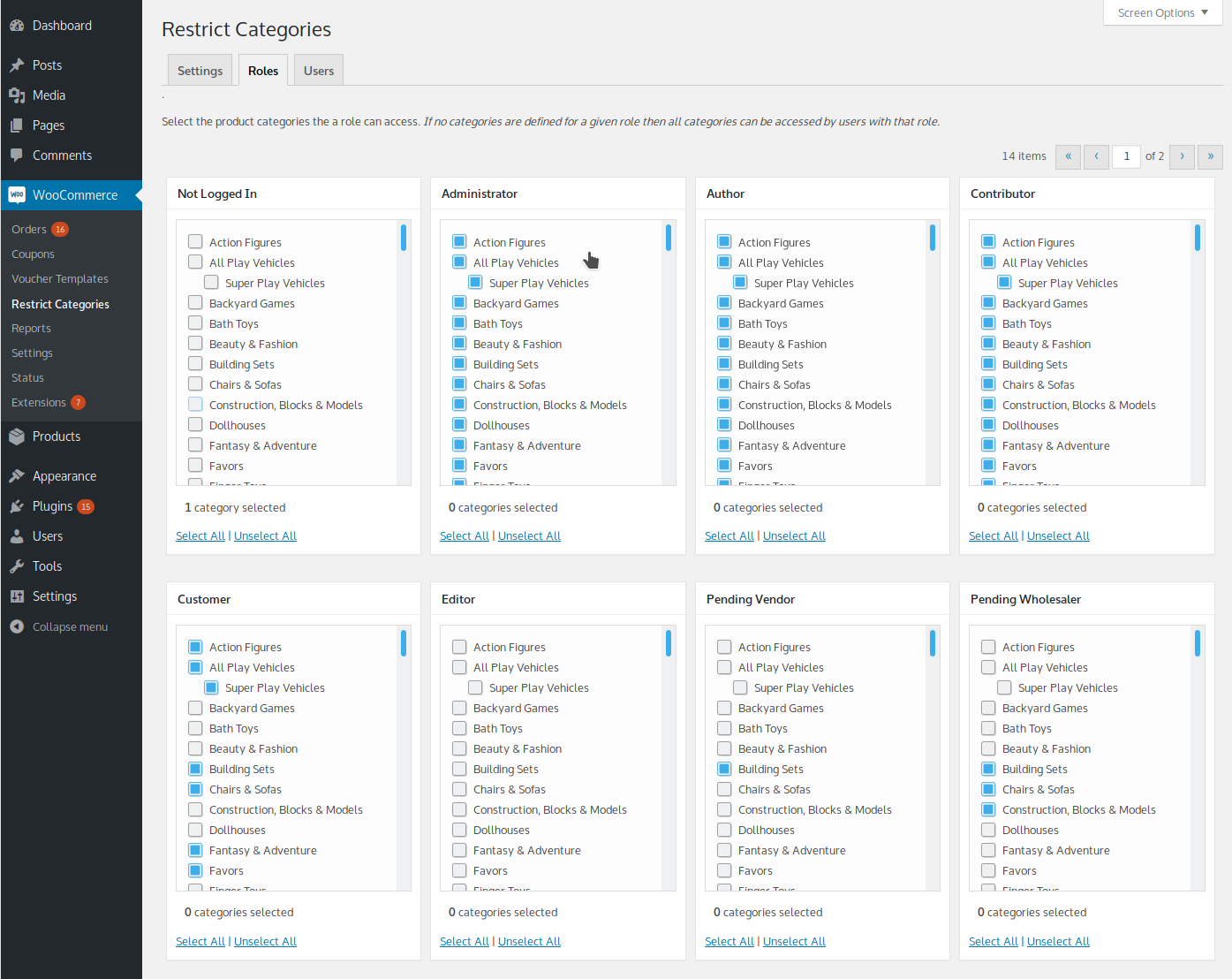
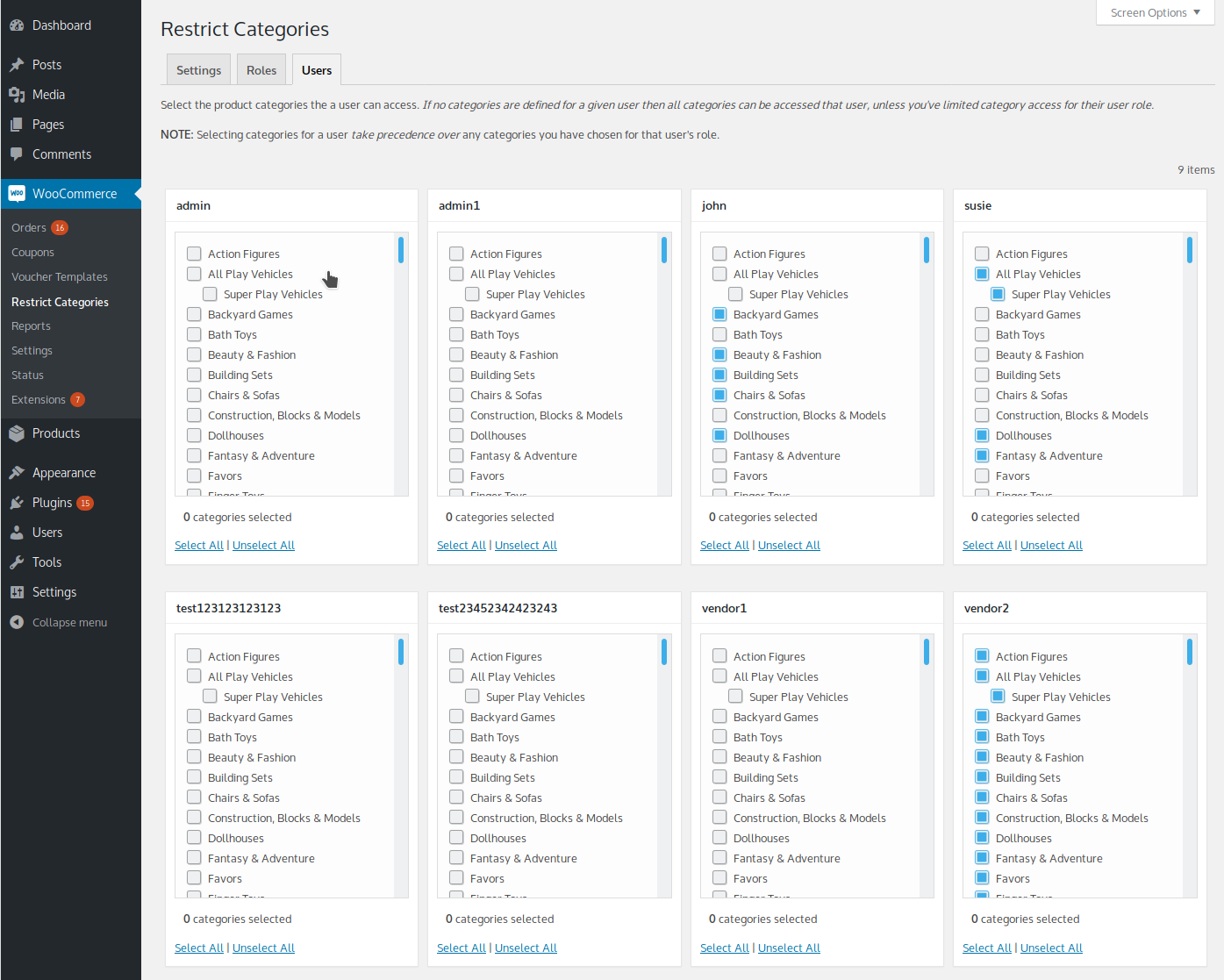
Protect category access by user
Uses the latest WooCommerce technology
Protect category access by role
Super fast performance on your site
Restrict Category Access Pro version 4.x is all new, totally rewritten from the ground up using the very latest technologies available in WooCommerce. It’s much faster, has much stronger protection mechanisms, and it’s easier to use.
Here’s an overview of how it works to protect access based on categories:
First, keep in mind that the software works based on products categories, that means individual category pages and products in specific categories. With that said, here’s the flow:
If the shopper is not logged in then whichever categories you’ve allowed to be accessed by non-logged-in users will be available to the shopper. If no categories are allowed then nothing will be available.
If the shopper is logged in then the plugin checks for any category access restrictions set for their user account, if any exist then they are applied. If none exist then the plugin checks for any category access restrictions based on their user role, if any exist then they are applied.
If no user account restrictions exist for the logged-in user then no restrictions are applied, the shopper has access to all products and categories of products.
When restrictions are applied, the plugin filters out any unauthorized categories from your sidebar category widget and your menu items that link to product categories.
Even if a shopper happens to have a URL to a category they are not authorized to access then the software prevents them from accessing the related category pages. Likewise, if the shopper somehow found a URL to a product in categories they are not authorized to access then the software prevents them from accessing that product page.
A simple configuration interface makes is easy to use
Five star support
All of our software comes with superior support via email and toll free phone.
Call us in the USA any time between 10am and 6pm CST
888-434-8388 (Country code is +1 from outside North America)
Frequently Asked Questions:
Will protected categories appear in my menus?
If your theme uses the standard WordPress menu features (most do), and you include categories in your menus, then any categories a shopper isn’t authorized to access will not appear in your menus.
Will protected categories appear in my widgets?
If you’re using the standard WooCommerce Product Categories widget then any categories a shopper isn’t authorized to access will not appear in your widget. This works whether you have the categories widget set to display in list mode or dropdown list mode. If you’re using a 3rd party widget to display categories then as long as it uses common WooCommerce “hooks” it should work.
What if I have a product that is in more than one category?
If the product is in any protected category that the shopper is not authorized to access then the product won’t be accessible.
Can I protect a top level category yet leave some or all subcategories unprotected?
Yes! The plugin has granular flexibility that lets you protect any categories regardless of their relationships.
Will it remove products from my main shop page?
Yes! The plugin filters out any products that are in categories the shopper is not authorized to access.
Does it protect category pages?
Yes! If the shopper tries to view a protected category page that they aren’t authorized to access then they cannot view the page.
What happens when a shopper tries to access protected content?
When a shopper tries to view a protected category page or a product that is in a protected category that they aren’t authorized to access then the shopper is instantly and transparently redirected back to your main shop page. This behavior can be controlled via a setting in the plugin so that when that setting is enabled if a product is in any allowed category then access is allowed; or when disabled if a product is in more than one category and any of those categories are not in the user’s allowed categories then access will be denied.
Can I translate the plugin to my preferred language?
Yes! All of our plugins are easily translated with any common WordPress language translator plugin, including WPML, Loco Translate, and many others.
Will it work with my theme on my site?
Most likely! As long as your theme uses standard WooCommerce hooks (nearly all do) then it should work great.
What is the minimum WooCommerce version required?
Technically, it works in any version of WooCommerce all the way back to version 2.6.
But, it runs exponentially faster in newer versions of WooCommerce! The reason is simple: The plugin is kept up to date and working with the latest versions of WooCommerce and we always ensure that it continually makes full use of all the newest technologies available in most current version of WooCommerce. So it’s a great idea to use the newest version of WooCommerce, if at all possible, to keep your site running as fast and secure as possible.
We keep all of our software up to date with the latest versions of WooCommerce and WordPress.
If you don't see any recent changes below it's because none have become necessary!
Version 4.0.10 - June 19, 2024

	WooCommerce 9 compatibility

	HPOS compatibility

Version 4.0.9 - January 10, 2022

	WooCommerce 6.x compatibility

Version 4.0.8 - February 25, 2021

	WooCommerce 5.x compatibility testing
Compatibility: WooCommerce 3.0 and newer
Latest version: 4.0.10