
Need to allow customers to define product add-ons?
WooCommerce Product Add-on Forms is a powerful form builder that lets you quickly create diverse forms that can be attached to any product. When a customer views the product they see your form above the Add to Cart button. So you can easily collect additional information from a customer when they buy your products.
Forms can contain any number of fields, including text input boxes, dropdown select lists, radio buttons, checkboxes, image select lists, swatch select lists, currency, passwords, dates, times, URLs, file uploads, color pickers, numeric fields, rich text editor fields, and more. And you can group your form fields into sections if you need to. Plus, any field can be set to be required or optional. If a field is required customers must enter data into the field before they can add the item to their cart.
You can also optionally assign a price to any field or field options. The price gets added to or subtracted from the base price of the product depending on how you define the price. For example, maybe you need to add a group of radio buttons to a product page. If you need to charge an extra amount if the user selects one of the radio buttons you can set the same price for each radio button option or set a different price for each radio button option. The same holds true for dropdown lists and checkboxes, etc. Price can be a flat fee to be added such as 10.25, or a flat fee to be subtracted such as -4.25, or it can be a percentage such as 10% added to the base cost of the product, or a negative percentage such as -10% subtracted from the base cost of the product, or it can be a multiplier such as 2x. Percentages and multipliers are calculated against the base cost of the product.
You can also conditionally display fields using simple form conditional logic rules. So for example, maybe you have a form that contains a checkbox and a text box, but you don’t want the text box to appear unless the customer checks the checkbox. No problem – you can do that easily. Conditional logic can be applied to any form field, or an entire section of fields.
It’s a great way to gather information for notes, engraving, monogramming, gift messages, and just about any type of information you’d like to collect from a customer when they buy your products.
When using forms in a product page all the form data is stored with the customer’s order so you can easily review the data by simply viewing the order in the admin area of your site. And the customer sees the data they provide in their order receipt and when viewing their order in your site’s My Account page.
Here’s what the form building looks like, as you can see in the screenshot the field types are on the left, and the form itself is on the right. In this example we’ve added two fields, a checkbox field and a radio button field.
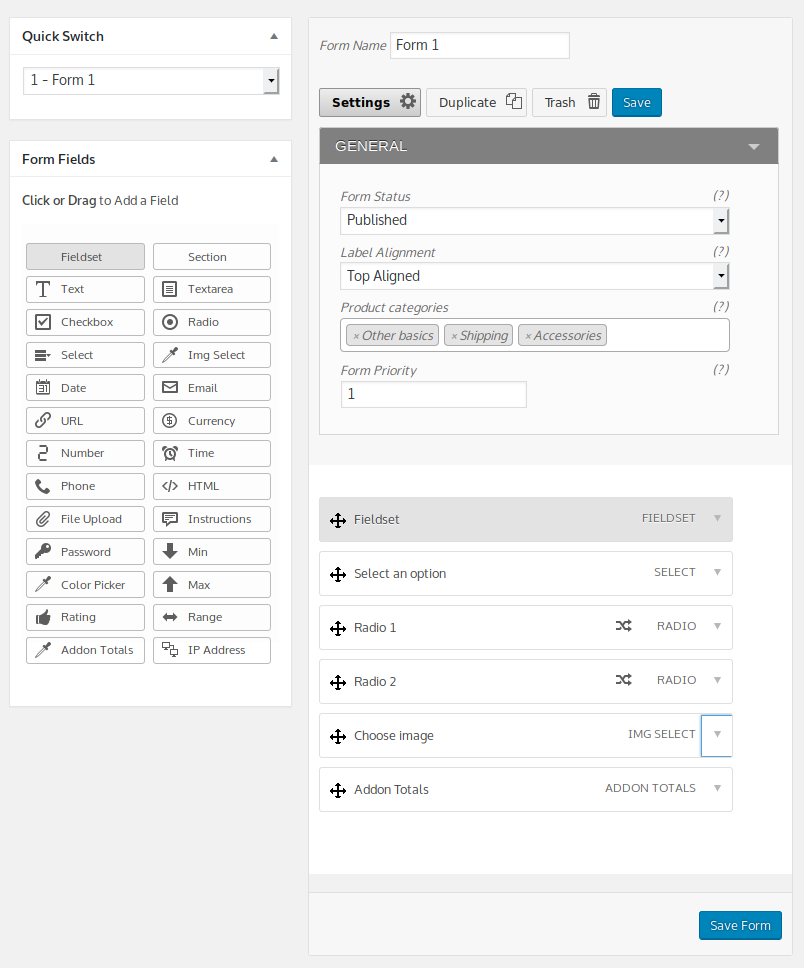
Adding new fields is a breeze, just click the field type to add it to the form, or drag a field onto the form. You can re-order the fields with simple drag and drop too. To edit a field just click the down arrow on the right side of the field box to expand the box, then you can edit the settings.
The CSS for the forms is entirely customizable, so you can adjust it to suit your needs without losing your changes when you update the plugin.
This plugin works with our Tiered Pricing plugin too.
Comes with great support via email and phone!
Questions? Use the Contact Us page or call us. Yes, we really do answer the phone during normal business hours.
Compatibility: WooCommerce 3.0 and newer
Current version: 3.3